
Building a Robust QR Code Scanner that Handles Damaged QR Codes
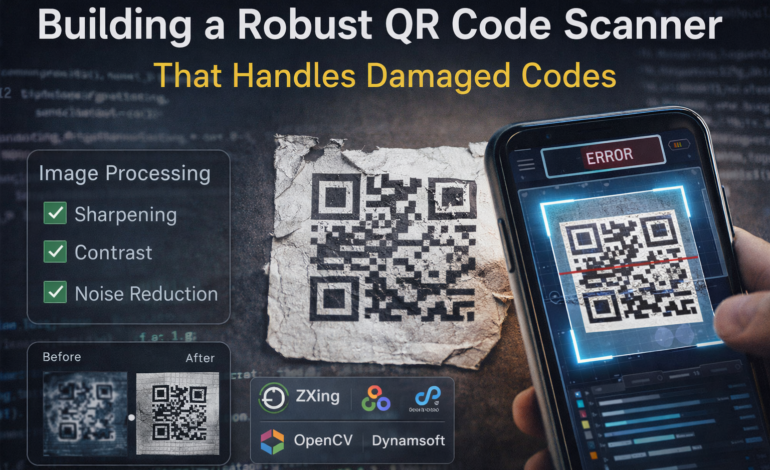

QR codes are designed to be resilient, but anyone who has worked with real-world scanning knows the gap between theory and practice. In controlled environments, most libraries can decode a clean QR code instantly. The challenge begins when codes are scratched, faded, poorly printed, or captured under low light. For developers building production-grade scanning systems, whether for logistics, retail, or mobile apps handling damaged QR codes is not an edge case. It is a requirement.
This article explores how to build a more robust QR code scanner by focusing on preprocessing techniques and choosing the right tools. The goal is simple: improve decoding success rates when input quality is far from ideal.
Why Damaged QR Code hazard to Decode?
QR codes rely on clear geometric patterns and contrast to be detected and decoded correctly. When damage occurs, it affects two critical stages:
First, detection, where the system identifies the QR code’s position and orientation.
Second, decoding, where the encoded data is extracted.
Damage can interfere with both.
A scratched or partially covered QR code might still be detectable, but missing modules can lead to decoding errors. Similarly, low contrast or motion blur can prevent detection altogether.
Although QR codes include built-in error correction (based on Reed-Solomon Error Correction), it has limits. If too much of the code is degraded, reconstruction fails.
This is where preprocessing becomes essential.
The Role of Preprocessing in Damaged QR Codes Scanning
Preprocessing is the step where you improve image quality before passing it to the decoder. A well-designed preprocessing pipeline can significantly increase scan success rates, especially for damaged inputs.
Instead of relying entirely on the decoding library, you prepare the image so that the decoder has a better chance of success.
Three techniques are particularly effective: image sharpening, contrast enhancement, and noise reduction.
Image Sharpening: Recovering Lost Edges
Damaged QR codes often suffer from blurred edges, either due to camera motion, low focus, or print degradation. Since QR detection relies heavily on sharp boundaries between black and white modules, restoring edge clarity can make a noticeable difference.
Image sharpening enhances these edges.
A common approach is to apply a sharpening kernel that emphasizes high-frequency components in the image. In simpler terms, it makes transitions between dark and light regions more distinct.
In practice, this helps the scanner:
-
Detect finder patterns more reliably
-
Improve module separation
-
Reduce ambiguity in decoding
However, sharpening must be applied carefully. Over-sharpening can introduce artifacts that confuse the decoder. The goal is to enhance clarity without distorting the structure of the QR code.
Contrast Enhancement: Making Codes Visible Again
Low contrast is one of the most common reasons QR codes fail to scan. This can happen due to poor lighting, faded prints, or reflective surfaces.
Contrast enhancement improves the difference between dark and light areas, making the QR pattern more distinguishable.
Techniques like histogram equalization or adaptive contrast adjustment can help normalize lighting across the image. This is especially useful in uneven lighting conditions, such as shadows or glare.
For mobile applications, contrast enhancement is often the difference between a failed scan and a successful one.
It allows the detection algorithm to:
-
Clearly identify the QR code region
-
Distinguish modules from the background
-
Reduce dependency on perfect lighting conditions
Noise Reduction: Cleaning the Input Signal
Noise in an image, random variations in pixel intensity can interfere with both detection and decoding. It is particularly common in low-light environments or with lower-quality cameras.
Noise reduction techniques aim to smooth out these variations while preserving important structural details.
Filters such as Gaussian blur or median filtering are commonly used. They help remove small, irrelevant artifacts without affecting the overall shape of the QR code.
The challenge lies in balance. Excessive smoothing can blur important features, while insufficient noise reduction leaves the image cluttered.
A well-tuned noise reduction step ensures that:
-
The QR code structure remains intact
-
Background interference is minimized
-
Decoding accuracy improves
Combining Preprocessing Techniques
Individually, each technique offers benefits. Combined, they form a powerful pipeline.
A typical preprocessing flow might look like this:
-
Apply noise reduction to clean the image
-
Enhance contrast to improve visibility
-
Sharpen edges to refine structure
The exact order and parameters depend on your use case, but the principle remains the same: prepare the image before decoding.
In real-world systems, this pipeline is often adaptive. For example, the system might apply stronger contrast enhancement only when low brightness is detected.
Choosing the Right Libraries
Preprocessing improves input quality, but the decoding engine still plays a crucial role. Different libraries offer varying levels of robustness when dealing with damaged QR codes.
Let’s look at three commonly used options.
1. ZXing: Lightweight and Widely Used
ZXing (Zebra Crossing) is one of the most popular open-source barcode scanning libraries. It is widely used in Android applications and supports multiple barcode formats.
Its strengths lie in:
-
Ease of integration
-
Lightweight performance
-
Strong community support
However, ZXing can struggle with heavily damaged or low-quality QR codes. It performs well under standard conditions but often requires preprocessing to handle more challenging scenarios.
For developers, ZXing is a good starting point, especially for basic applications. But for advanced use cases, additional optimization is usually needed.
2. OpenCV: Full Control with Computer Vision
OpenCV is not a dedicated barcode library, but it provides powerful tools for image processing and computer vision.
Its QR code module allows detection and decoding, but its real strength lies in preprocessing.
With OpenCV, you can:
-
Build custom pipelines for sharpening, contrast, and noise reduction
-
Handle edge cases with fine-grained control
-
Experiment with different image transformations
The trade-off is complexity. OpenCV requires more effort to implement and optimize compared to plug-and-play libraries.
For developers dealing with damaged QR codes, OpenCV is often used alongside other libraries to improve input quality before decoding.
3. Dynamsoft Barcode Reader: Enterprise-Grade Reliability
Dynamsoft Barcode Reader is a commercial SDK designed for high-performance scanning in real-world conditions.
It is built to handle:
-
Damaged or partially obscured codes
-
Low-light environments
-
High-speed scanning requirements
Unlike basic libraries, it includes advanced algorithms that combine preprocessing and decoding internally. This reduces the need for manual tuning.
Its advantages include:
-
Higher success rates on degraded inputs
-
Faster decoding in complex scenarios
-
Support for enterprise-scale applications
The main consideration is cost, but for systems where reliability directly impacts operations, it can be a worthwhile investment.
| Feature / Criteria | ZXing | OpenCV | Dynamsoft Barcode Reader |
|---|---|---|---|
| Type | Open-source barcode library | Computer vision framework | Commercial barcode SDK |
| Ease of Integration | Easy (especially Android) | Moderate to complex | Easy with SDK support |
| Preprocessing Support | Minimal (external needed) | Extensive (full control) | Built-in + optimized |
| Performance on Damaged QR Codes | Moderate | Depends on implementation | High (optimized for edge cases) |
| Detection Accuracy | Good for clean codes | High (with tuning) | Very high |
| Decoding Speed | Fast | Moderate | Fast + optimized |
| Low-Light Handling | Limited | Customizable | Strong |
| Customization | Limited | Very high | Moderate (config-based) |
| Maintenance Effort | Low | High (you manage pipeline) | Low |
| Platform Support | Android, Java, limited others | Cross-platform | Cross-platform (mobile, web, desktop) |
| Best Use Case | Basic apps, prototypes | Custom CV pipelines | Enterprise-grade scanning |
| Cost | Free | Free | Free trial available |
Practical Tips for Building a Robust Scanner
Beyond preprocessing and library selection, a few practical considerations can improve performance significantly.
- Optimize Camera – Ensure that your application uses appropriate focus modes and exposure settings. Even the best algorithms cannot compensate for extremely poor input.
- Fix Resolution – Higher resolution images provide more detail, but they also increase processing time. Finding the right balance is key, especially for real-time applications.
- Implement Fallback Strategies – If the first scan attempt fails, you can retry with adjusted preprocessing parameters or request the user to reposition the camera.
- Test with Real-World Data – Synthetic examples rarely capture the variability seen in production environments. Collect samples of damaged, faded, and distorted QR codes to evaluate your system realistically.
Final Thoughts
Building a robust QR code scanner is not just about choosing a library. It is about understanding how real-world conditions affect detection and decoding, and designing your system to handle those challenges.
Preprocessing plays a central role in this process. Techniques like image sharpening, contrast enhancement, and noise reduction can significantly improve scan success rates when dealing with damaged inputs.
At the same time, the choice of tools matters. Lightweight libraries like ZXing are suitable for basic use cases, while OpenCV offers flexibility for custom pipelines. For enterprise applications, solutions like Dynamsoft provide higher reliability out of the box.
Ultimately, the goal is to reduce friction. A good scanner works not only when conditions are perfect, but also when they are not. That is what makes it truly robust.
⚠ Disclaimer: This article has been reviewed and updated to reflect current industry trends, technology developments, and logistics best practices which is contributed by an independent author. We do not guarantee its accuracy or completeness. The views expressed are those of the author and do not reflect this website. Readers should verify information independently and consult professionals where necessary.