
Google Merchant Center Suspended: How to Fix It (Step-by-Step)


If you’re searching for “Google Merchant Center suspended how to fix”, you’re not alone. When your account gets suspended, your entire eCommerce business can stop overnight.
No ads.
No product visibility.
No sales.
And honestly, the most frustrating part is this:
Google usually doesn’t clearly explain what went wrong.
But the good news?
You can fix it—if you understand what Google is really looking for.
This guide will walk you through it in a simple, practical way.

🔍 What Does Google Merchant Center Suspended – Actually Mean?
A suspension means Google has found something on your website, product data, or business setup that doesn’t meet their policies.
When that happens:
- Your products disappear from Google Shopping
- Your ads stop running
- Your traffic drops almost instantly
For most e-commerce stores, this hits revenue hard.
⚠️ Common Reasons Your Google Merchant Center Suspended
Let’s break down the real issues that usually cause this.
-
Misrepresentation (The Biggest Reason)
This is where most people get stuck.
Google flags “misrepresentation” when your store doesn’t feel trustworthy or fully transparent.
That can include:
- Product info that feels misleading
- Missing or unclear business details
- Inconsistent information across your site
Simple examples:
- Showing big discounts that aren’t real
- No clear contact details
- Different pricing on product page vs checkout
- Overhyped claims like “best product ever”
Even small trust issues can trigger a suspension.
-
Missing Important Pages
If your store doesn’t clearly show basic policies, Google won’t trust it.
You should always have:
- Privacy Policy
- Refund / Return Policy
- Terms & Conditions
- Contact page
If these are missing or hard to find, it’s a red flag.
-
Poor or Confusing Checkout
Google pays close attention to the buying experience.
Problems like:
- No secure payment (no HTTPS)
- Hidden fees
- Complicated checkout steps
All of these can lead to suspension.
-
Product Feed Problems
Sometimes the issue is in your data, not your website.
For example:
- Price mismatch between feed and website
- Missing brand or GTIN
- Weak or unclear product descriptions
-
Policy Violations
If you’re selling restricted items or not following Google’s rules, your account can be suspended without warning.
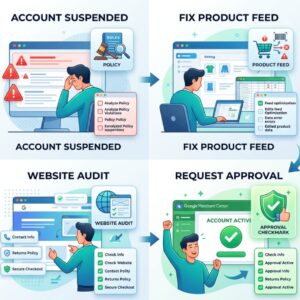
How to Fix Google Merchant Center Suspension
Google Merchant Center suspended account recovery: Now let’s talk about fixing it the right way
✅ Step 1: Understand the Real Problem
Start here:
- Check the Diagnostics tab in Merchant Center
- Read the suspension email carefully
Just keep in mind Google’s message is often vague.
So don’t rely on that alone. You’ll need to review everything.
✅ Step 2: Fix Trust Issues on Your Website
Ask yourself: Does your site look like a real, trustworthy business?
Make sure you have:
- Clear business name (same everywhere)
- Real address and phone number
- Professional email
- Some form of credibility (reviews, branding, etc.)
✅ Step 3: Clean Up Your Policy Pages
Your policies should be:
- Easy to find (footer is best)
- Clearly written
- Honest and complete
Don’t copy random templates — make them match your actual business.
✅ Step 4: Fix Product Information
Go through your products carefully.
Check:
- Pricing is consistent everywhere
- Images are real and relevant
- Descriptions are accurate
- No exaggerated claims
This step matters more than most people think.
✅ Step 5: Handle Technical Issues
Make sure your site is technically sound:
- HTTPS is active
- No broken pages
- Loads fast
- Works well on mobile
Even small technical issues can affect trust.
✅ Step 6: Remove Anything That Feels “Spammy”
Avoid things like:
- Fake urgency (“Only 1 left”)
- Over-promising results
- Misleading offers
If it feels pushy or unrealistic, it’s better to remove it.
✅ Step 7: Request a Review
Once everything is fixed:
Go to Merchant Center → Request Review
When you submit:
- Clearly explain what you changed
- Be honest and specific
Usually, it takes around a week to get a response.
🔥 A Few Practical Tips
From real experience:
- Fix everything before requesting review
- Don’t submit multiple times too quickly
- Keep your business info consistent everywhere
- Double-check both your website and product feed
📊 What Most People Get Wrong
Here’s the truth:
Most store owners fix one issue…
But Google is reviewing the entire store.
That’s why accounts stay suspended even after multiple attempts.
✔ Final Checklist Before You Apply Again
Before you click “Request Review,” check:
- Your website looks complete and trustworthy
- All policies are visible
- Product info is accurate
- Nothing feels misleading
- Business details match everywhere
Final Thoughts
A Google Merchant Center suspension is frustrating, no doubt.
But it’s not random.
Google is simply checking one thing:
Can users trust your store?
It’s not just about products.
It’s about your entire business.
Need Help Fixing Your GMC Suspension?
At GMC Approval, we help e-commerce brands:
- Recover suspended accounts
- Fix misrepresentation issues
- Clean up product feeds
- Stay compliant long-term
If your account is still stuck, guessing won’t help.
Fixing it properly will.
🔚 Conclusion
This isn’t a quick-fix situation.
To recover your Google Merchant Center suspended account, you need to build a store that is:
✔ Clear
✔ Honest
✔ Consistent
Do that once, and you won’t have to deal with suspension again.
You can go now for more information here: GMC Approval
⚠ Disclaimer:
This article is contributed by an independent author and is for informational purposes only. We do not guarantee its accuracy or completeness. The views expressed are those of the author and do not reflect this website. Readers should verify information independently and consult professionals where necessary.